
How to Connect GSM FCT Device to Computer | Setup Guide | Bonrix
Step-by-step tutorial to connect Bonrix Multi-Functional GSM FCT Device/Modem to your computer or laptop. Enable auto-dialing, voice broadcasting, SMS, IVRS routing & call recording for telecalling, marketing, and business communication across India.
🎥 Watch: Complete setup guide for GSM FCT connection to PC/laptop
🔌 Connect GSM FCT Device to Computer – Quick Setup Guide
This guide explains how to connect the Multi-Functional GSM FCT Device/Modem to your computer or laptop to unlock powerful telephony features: auto-dialing, voice broadcasting, SMS notifications, IVRS call routing, call recording, and click-to-call web integration.
📦 What You'll Need
- ✅ Bonrix GSM FCT Device/Hardware/Modem
- ✅ Active GSM SIM card (Airtel, Jio, Vi, BSNL, etc.)
- ✅ USB cable (Type-A to Micro-USB/Type-C) – included with device
- ✅ Windows PC/Laptop (Windows 7/8/10/11) or Linux system
- ✅ Internet connection (for initial driver/software download)
- ✅ Admin rights on your computer for driver installation
🔄 Step-by-Step Connection Process
- 📲 Insert SIM Card: Power off the GSM FCT device, insert an active SIM into the slot, and power it on
- 🔌 Connect via USB: Plug the USB cable into the GSM FCT device and your computer's USB port
- 💻 Install Drivers: Windows will auto-detect the device. If prompted, install Bonrix GSM FCT drivers from www.mVoiceCall.com/drivers
- ⚙️ Install Software: Download and install Bonrix mVoiceCall software or configure via web dashboard at www.mVoiceCall.com/setup
- 🔐 Activate Device: Launch the software, enter your Bonrix license key (provided at purchase), and register the device
- ✅ Test Connection: Send a test SMS or make a test call to confirm successful setup
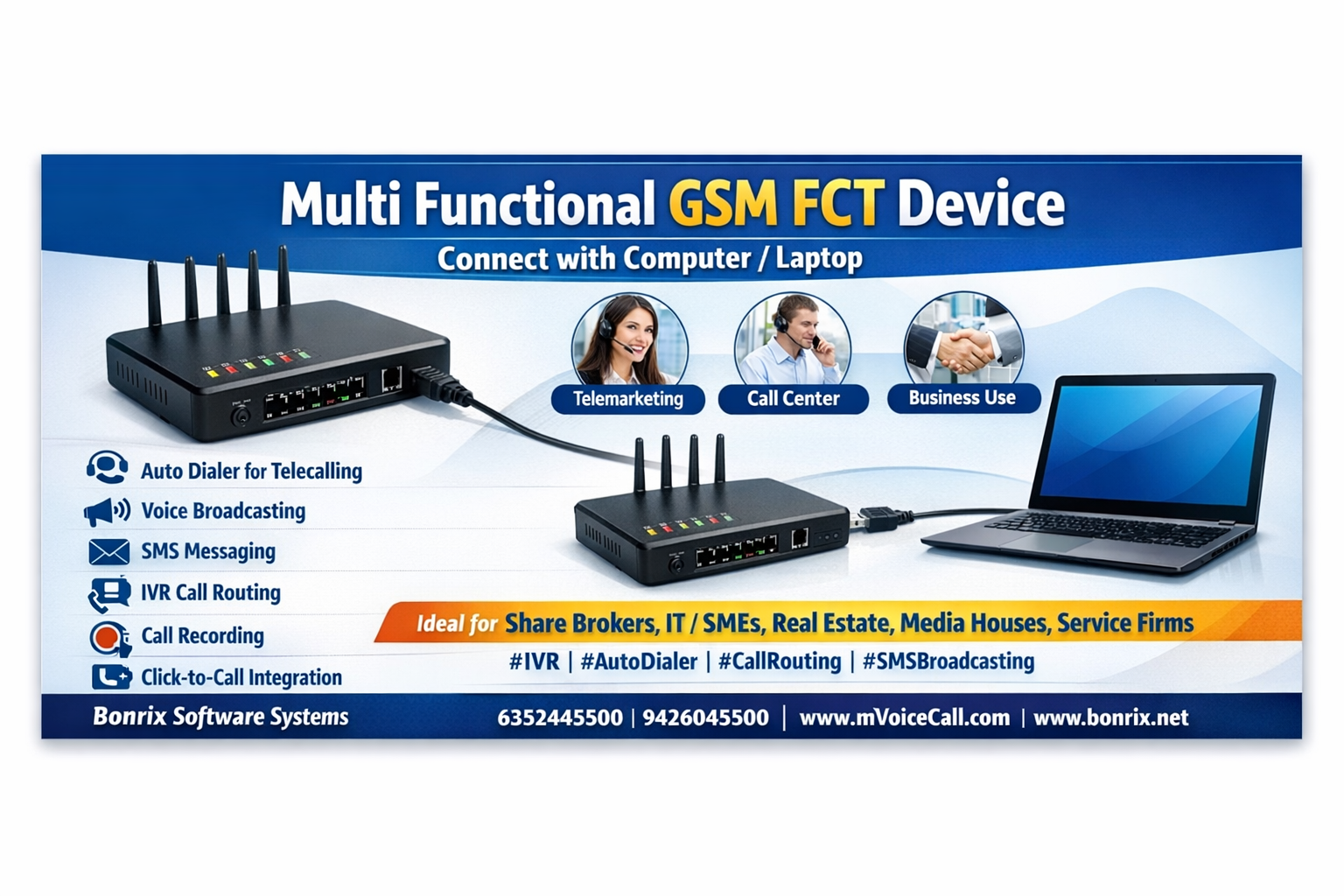
👉🏻 Unlock 6 Powerful Features After Connection
Once connected, your GSM FCT device enables:
- 📞 Auto-Dialer for Telecallers: Automatically dial lead lists, reduce manual effort, boost agent productivity
- 📢 Voice Broadcaster for Marketing: Send pre-recorded promotional messages to thousands of contacts instantly
- 📩 SMS Messaging for Notifications: Trigger transactional SMS, OTPs, alerts via GSM – no internet dependency
- 🎛️ IVRS Call-Routing for Inbound Calls: Interactive Voice Response to route callers to right department/agent
- 🔊 Call Recording (Inbound + Outbound): Auto-record calls for quality assurance, training, compliance
- 🖱️ Click-to-Call – Easy Web Integration: Embed call buttons on websites/CRMs – initiate calls via GSM FCT API
🎯 Ideal Applications Across Indian Industries
📈 Share Brokers: Auto-dial clients for portfolio updates, broadcast market alerts, record advisory calls
💼 IT/ITES Enterprises: Streamline lead follow-ups, automate reminders, route support calls via IVRS
🏠 Real Estate Agencies: Broadcast property launches, auto-dial hot leads, send site-visit SMS reminders
🏢 SMEs & Service Firms: Manage inquiries with IVRS, send payment alerts, track agent performance
📰 Media Houses: Launch subscription campaigns via voice broadcast, send breaking news via SMS
⚙️ Technical Compatibility & Integration
- 🖥️ OS Support: Windows 7/8/10/11, Linux (Ubuntu, CentOS)
- 🔌 Connection: USB 2.0/3.0, optional Ethernet for network deployment
- 🌐 API Access: RESTful APIs for click-to-call, SMS trigger, call status webhooks
- 🔁 Multi-Device Scaling: Connect multiple GSM FCT units for high-volume operations
- 🔐 Security: Encrypted call recordings, TRAI DLT compliant SMS, audit-ready logs
❓ Troubleshooting Common Setup Issues
- ⚠️ Device not detected? Try different USB port, reinstall drivers, check Device Manager
- ⚠️ SIM not recognized? Ensure SIM is active, PIN disabled, and properly inserted
- ⚠️ Software won't activate? Verify license key, internet connectivity, and system date/time
- ⚠️ Calls/SMS failing? Check SIM balance, network signal, and TRAI DLT template registration
- 🆘 Need help? Contact Bonrix support via WhatsApp or email for remote assistance
💡 Why Choose Bonrix GSM FCT?
- ✅ Hardware Reliability: GSM-based – works without stable internet, unlike VoIP solutions
- ✅ All-in-One Value: One device replaces dialer + broadcaster + SMS gateway + IVRS + recorder
- ✅ Local Support: Ahmedabad-based team with pan-India deployment & Hindi/regional language assistance
- ✅ Scalable: Start with one unit; expand to multi-device clusters as volume grows
- ✅ Compliance Ready: Built-in TRAI DLT, call consent management, DPDP-aligned data handling
Ready to power your business communication with GSM FCT?
📞 Contact Bonrix Software Systems
📍 Ahmedabad, Gujarat (India)
📱 Call/WhatsApp: +91 63524 45500 | +91 94260 45500
🔗 www.mVoiceCall.com | www.bonrix.net
✉️ info@bonrix.in
📥 Download GSM FCT Drivers & Software